Home Billing & Payments Article
How to Load Balance into Your Account?
Posted on 2026-01-10How to Load Balance into Your Account
Bitsellfy allows you to add funds to your account using our site Wallet. The balance in your Wallet can be used to purchase digital products directly, making checkout faster and easier. Please note that Wallet balances cannot be withdrawn.
Loading Your Wallet
You can add funds to your Wallet using the following payment methods:
- Card Payments: Debit or credit cards are supported for instant top-ups.
- Cryptocurrency Payments: All cryptocurrencies and networks supported by Cryptomus are accepted.
Step-by-Step Guide
- Log in to your Bitsellfy account.
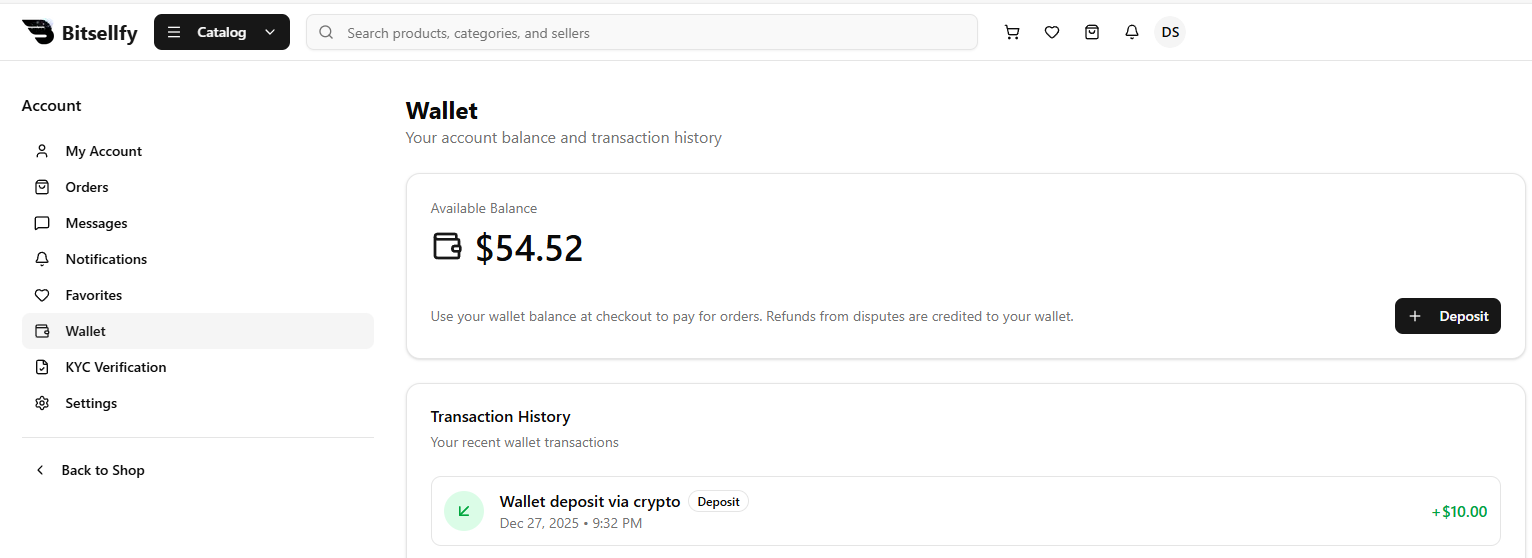
- Go to your Wallet section in the dashboard.
- Click on Add Funds or Top Up Wallet.
- Select your preferred payment method: Card or Cryptocurrency.
- Enter the amount you wish to load and follow the payment instructions.
- Once the payment is confirmed, your Wallet balance will be updated instantly.
Using Wallet Balance for Purchases
- When purchasing a digital product, select Pay with Wallet at checkout.
- The total purchase amount will be deducted from your Wallet balance.
- If your Wallet balance is insufficient, you can pay the remaining amount using another supported payment method.
Important Notes
- Wallet funds cannot be withdrawn to your bank account or crypto wallet.
- Ensure your payment information is correct before confirming top-ups.
- If you encounter issues while loading your Wallet, contact our support team for assistance.
Found this article helpful?
[ 0 Out of 0 Found Helpful ]